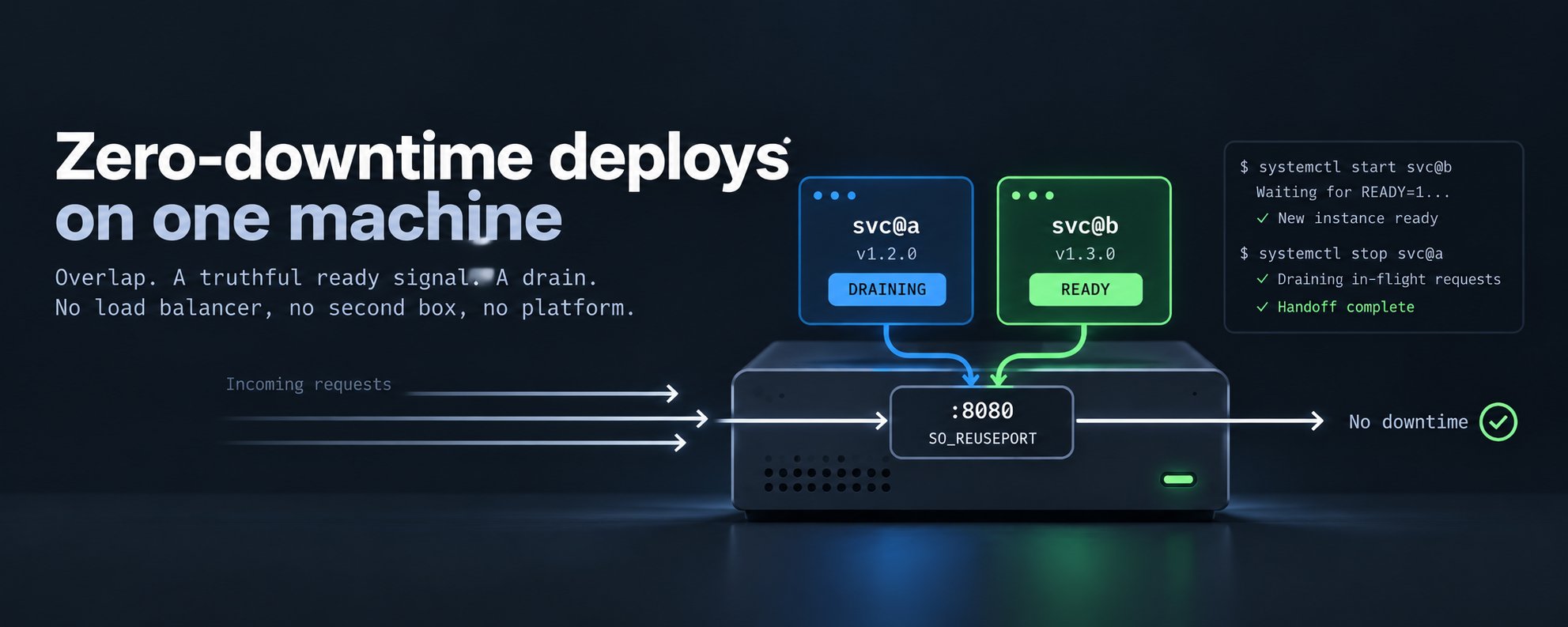
I had a small backend service that dropped requests every time I deployed it. Only for a few seconds, but it happened on every deploy, and anything calling it got 502s during that window.
The reason was simple enough. It’s one binary running under a systemd unit, with a database behind it. When it starts, it connects to the database and runs migrations before it binds its port. So a systemctl restart leaves a few seconds where nothing is listening, requests get connection refused, and the proxy in front turns those into 502s. You can see it clearly if you stop the service and hit it in a loop: errors for exactly as long as the process is down.
Most advice for fixing this starts with adding more infrastructure. I wanted to see how far I could get without any.
Why I didn’t want the usual fix
The common answers are a second instance behind a load balancer, or a container platform that rolls instances for you. They work, and if you already run those, use them. But for one process on one box, it meant a second copy to keep running, a load balancer to look after, health checks to tune, and maybe a platform to learn, just to close a gap of a few seconds.
When I looked at what all that machinery actually does during a deploy, it comes down to this: start the new process, wait until it’s ready, stop the old one. Every Linux box already has an init system that starts processes, waits on them, and stops them, and a kernel that can share a port between processes or redirect it to another one. So the real question was whether what’s already on the machine could do the whole job.
What a zero-downtime deploy needs
Whatever the setup, rolling instances, blue/green, or something else, it comes down to three things:
- Overlap. The new instance can accept work before the old one lets go.
- A ready signal you can trust. The new instance itself says when it can serve, instead of something outside guessing.
- A drain. The old instance finishes the requests it already has instead of dropping them.
So zero-downtime isn’t really a load-balancer problem. It’s an overlap, readiness, and drain problem, and a load balancer is just one way to get those three. Side by side:
| Requirement | With multiple instances | On one machine |
|---|---|---|
| Overlap | A second instance behind a load balancer | A second process on the same box, sharing the port or on a port of its own |
| Ready signal | A health check | The new process says it’s ready, or a health check on its own port |
| Drain | A grace period before the kill | Stop sending it new connections, let in-flight requests finish, then exit |
There are two ways to get these on one machine, depending on whether you can change the service’s code. If you can, both copies share the port and the process itself says when it’s ready. If you can’t, each copy gets its own port, and a small script checks health and switches traffic with a firewall rule. Both run the two copies as systemd units.
Option 1: share the port
This is the option when you can change the code. Make the service a systemd template, svc@.service, with two slots: a and b. Normally only one of them runs. A deploy starts the idle slot, waits for it to report ready, then stops the live one. Three pieces make that safe.
Overlap: SO_REUSEPORT
With SO_REUSEPORT set on the listener, a second process can bind the same port while the first one is still serving. New connections may then be distributed across the two listeners by the kernel.
Here, that’s a temporary overlap, not load balancing, and it’s worth being clear about what it means. This isn’t a clean switch where the new version takes new traffic while the old one drains. For the few seconds of overlap, both versions accept new connections; then the old one is stopped and finishes what it already has. That’s fine for most services, but it matters if the two versions can’t handle the same request the same way, which is covered under running two copies below.
In Go, setting the option is a few lines in a ListenConfig.Control callback:
go
import (
    "context"
    "net"
    "syscall"

    "golang.org/x/sys/unix"
)

func listenReuse(addr string) (net.Listener, error) {
    lc := net.ListenConfig{
        Control: func(_, _ string, c syscall.RawConn) error {
            var err error
            c.Control(func(fd uintptr) {
                err = unix.SetsockoptInt(int(fd), unix.SOL_SOCKET, unix.SO_REUSEPORT, 1)
            })
            return err
        },
    }
    return lc.Listen(context.Background(), "tcp", addr)
}
Ready: Type=notify
With Type=notify in the unit, systemd waits for the process to send READY=1 over NOTIFY_SOCKET. The process sends it only after it has connected to the database, finished migrating, and bound the port. Until then systemctl start svc@b blocks, and if the message never arrives, the start times out and fails. There’s no health polling, and no sleeping for a guessed number of seconds.
It doesn’t need a library either. It’s a single datagram to a socket path that systemd puts in the environment:
go
func sdNotify(state string) {
    path := os.Getenv("NOTIFY_SOCKET")
    if path == "" {
        return // not under systemd; harmless
    }
    conn, err := net.DialUnix("unixgram", nil, &net.UnixAddr{Name: path, Net: "unixgram"})
    if err != nil {
        return
    }
    defer conn.Close()
    conn.Write([]byte(state))
}
Drain: shutdown on SIGTERM
On SIGTERM, the process calls http.Server.Shutdown with a timeout. That closes the listener and gives in-flight requests time to finish. TimeoutStopSec in the unit has to be longer than that timeout. The signal handler should be registered first, before any slow startup work, so a stop request that arrives during startup isn’t lost.
One small helper first. go srv.Serve(ln) only starts a goroutine, and nothing says it has run yet. This wrapper reports the moment Serve calls Accept for the first time, which means its accept loop is actually running:
go
type readyListener struct {
    net.Listener
    once      sync.Once
    accepting chan struct{}
}

func (l *readyListener) Accept() (net.Conn, error) {
    l.once.Do(func() { close(l.accepting) })
    return l.Listener.Accept()
}
Here’s main with all three in place:
go
func main() {
    // 1. Signal handler first, before anything that can take time.
    ctx, stop := signal.NotifyContext(context.Background(), syscall.SIGTERM, syscall.SIGINT)
    defer stop()

    // 2. The slow part. Nothing is listening yet — and that's fine,
    //    because the old slot still is.
    db := mustConnect(ctx)
    mustMigrate(ctx, db)

    // 3. Bind with SO_REUSEPORT so we can share the port with the old slot.
    ln, err := listenReuse(":8080")
    if err != nil {
        log.Fatal(err)
    }
    rl := &readyListener{Listener: ln, accepting: make(chan struct{})}
    srv := &http.Server{Handler: newHandler(db)}
    serveErr := make(chan error, 1)
    go func() { serveErr <- srv.Serve(rl) }()

    // 4. READY only once Serve is in its accept loop. If Serve fails
    //    first, exit: the start fails and the old slot keeps serving.
    select {
    case <-rl.accepting:
        sdNotify("READY=1")
    case err := <-serveErr:
        log.Fatalf("serve failed before ready: %v", err)
    }

    // 5. Wait for SIGTERM, then drain. Exit if Serve dies on its own.
    select {
    case <-ctx.Done():
    case err := <-serveErr:
        log.Fatalf("serve stopped: %v", err)
    }
    sdNotify("STOPPING=1")
    shutdownCtx, cancel := context.WithTimeout(context.Background(), 30*time.Second)
    defer cancel()
    if err := srv.Shutdown(shutdownCtx); err != nil {
        log.Printf("drain cut off: %v", err)
    }
}
The order is what makes this work: signal handler, slow work, bind, start serving, READY, wait.
Since everything depends on READY being true, it’s worth being exact about what it means here. When this process sends READY, four things hold: the database is connected, migrations are done, the socket is listening, and the server’s accept loop is running.
The last one is what the wrapper is for. Without it, READY would go out as soon as the goroutine was started. In practice that gap is tiny and mostly harmless: once a socket is listening, the kernel completes incoming connections and queues them until the process accepts them, so nothing gets refused. But if Serve failed straight away, READY would already be sent, and systemd would stop the old slot in favour of a process that will never answer. With the wrapper, READY waits for the accept loop, and if Serve returns first, the process exits and the deploy fails with the old slot untouched.
There’s one more thing READY doesn’t control. Because the port is shared, the kernel starts handing the new slot connections as soon as it listens, not when it sends READY. READY only decides when systemd lets the old slot go. That’s why the bind comes after the migrations and not before.
The unit file
One template, two instances. %i is the slot name.
/etc/systemd/system/svc@.service
[Unit]
Description=svc (slot %i)
After=network-online.target
Wants=network-online.target

[Service]
Type=notify
User=svc
EnvironmentFile=/srv/svc/env
ExecStart=/srv/svc/current/bin/svc
Restart=always
RestartSec=2

# start blocks until READY=1; a migration that hangs fails the deploy, not the site
TimeoutStartSec=90
# must sit above the drain cap in the code (30s)
TimeoutStopSec=45
KillSignal=SIGTERM

[Install]
WantedBy=multi-user.target
Enabling a slot is what brings it back after a reboot. The deploy script moves the enable from the old slot to the new one, so only one slot is ever enabled.
The deploy script
Leaving out the part that fetches the release:
!/usr/bin/env bash
set -euo pipefail
TAG="$1"
ROOT=/srv/svc

# 1. Pick slots, refuse unsafe states. Before touching anything.
a_up=$(systemctl is-active svc@a || true)
b_up=$(systemctl is-active svc@b || true)
if [[ $a_up == active && $b_up == active ]]; then
  echo "both slots running; refusing" >&2; exit 1
fi
if [[ $a_up == active ]]; then OLD=a; NEW=b; else OLD=b; NEW=a; fi

# 2. Pull and flip.
fetch_release "$TAG" "$ROOT/releases/$TAG"
OLD_CURRENT=$(readlink "$ROOT/current")
ln -sfn "$ROOT/releases/$TAG" "$ROOT/current"

# 3. Start the new slot. Blocks until READY=1 or TimeoutStartSec.
if ! sudo systemctl start "svc@$NEW"; then
  # 4. Back out. Stop it or Restart=always loops it forever.
  sudo systemctl stop "svc@$NEW" || true
  ln -sfn "$OLD_CURRENT" "$ROOT/current"
  echo "new slot failed to start; live slot untouched" >&2
  exit 1
fi

# 5. Hand over. Old slot gets SIGTERM and drains.
sudo systemctl enable "svc@$NEW"
sudo systemctl disable "svc@$OLD"
sudo systemctl stop "svc@$OLD"
echo "handoff $OLD -> $NEW complete"
Two details in there matter more than they look.
If both slots are somehow running, the script refuses to continue. Otherwise systemctl start on a slot that’s already up returns success without doing anything, the old binary keeps running, and the deploy looks fine while shipping nothing.
When the new slot fails to start, the script stops it explicitly. With Restart=always, a failed slot would otherwise keep being restarted every two seconds against the broken release. After stopping it, the script points current back at the old release and exits with an error. The live slot keeps serving the whole time, so a bad release fails at step 3 and nobody calling the service notices.
Option 2: a port per copy
If you can’t change the code, a script can do the waiting instead of the process. It can’t use the shared port from option 1, though. Both copies answer on that port, so a health check can’t tell which one replied, and it might get a healthy response from the old copy while the new one is still migrating.
Give each slot its own port and that problem goes away. This suits a service you can’t or don’t want to touch, like a third-party binary. It only needs a health endpoint, a configurable port, and a clean shutdown on SIGTERM.
Slot a listens on 8081 and slot b on 8082. A NAT rule sends port 8080 to whichever one is live, so clients keep using 8080 and never see the slot ports.
The one-time setup puts that rule in its own chain, so a deploy only ever touches one line:
sh
iptables -t nat -N SVC
iptables -t nat -A SVC -p tcp --dport 8080 -j REDIRECT --to-ports 8081
iptables -t nat -A PREROUTING -m addrtype --dst-type LOCAL -j SVC
iptables -t nat -A OUTPUT -m addrtype --dst-type LOCAL -j SVC
The PREROUTING jump covers traffic from other machines. The OUTPUT jump covers callers on the same box, which would otherwise skip the rule and hit a closed port.
The unit is the same template as in option 1, with two changes: Type=simple, because nothing sends READY, and a port per slot:
ini
Type=simple
# PORT=8081 in slot-a.env, PORT=8082 in slot-b.env
EnvironmentFile=/srv/svc/slot-%i.env
And the deploy script becomes:
!/usr/bin/env bash
set -euo pipefail
TAG="$1"
ROOT=/srv/svc
declare -A PORT=([a]=8081 [b]=8082)

# 1. The firewall rule is the record of which slot is live. Accept only
#    one rule pointing at a known slot; anything else stops the deploy.
if [[ $(sudo iptables -t nat -S SVC | grep -c '^-A SVC ') -ne 1 ]]; then
  echo "SVC chain missing or not exactly one rule; refusing" >&2; exit 1
fi
live=()
for slot in a b; do
  if sudo iptables -t nat -C SVC -p tcp --dport 8080 -j REDIRECT --to-ports "${PORT[$slot]}" 2>/dev/null; then
    live+=("$slot")
  fi
done
case "${live[*]}" in
  a) OLD=a; NEW=b ;;
  b) OLD=b; NEW=a ;;
  *) echo "SVC rule points at neither slot; refusing" >&2; exit 1 ;;
esac
if systemctl is-active --quiet "svc@$NEW"; then
  echo "svc@$NEW is already running; refusing" >&2; exit 1
fi

# 2. Pull and flip.
fetch_release "$TAG" "$ROOT/releases/$TAG"
OLD_CURRENT=$(readlink "$ROOT/current")
ln -sfn "$ROOT/releases/$TAG" "$ROOT/current"

# 3. Start the new slot and wait up to 90s for its health check.
sudo systemctl start "svc@$NEW"
ready=
for _ in $(seq 90); do
  if curl -fsS -o /dev/null "http://127.0.0.1:${PORT[$NEW]}/healthz"; then
    ready=1; break
  fi
  sleep 1
done

# 4. Never healthy: back out. Traffic never left the old slot.
if [[ -z $ready ]]; then
  sudo systemctl stop "svc@$NEW" || true
  ln -sfn "$OLD_CURRENT" "$ROOT/current"
  echo "new slot never became healthy; live slot untouched" >&2
  exit 1
fi

# 5. Switch traffic by replacing the one rule, then stop the old slot.
sudo iptables -t nat -R SVC 1 -p tcp --dport 8080 -j REDIRECT --to-ports "${PORT[$NEW]}"
sudo netfilter-persistent save   # keep the rule across reboots (Debian/Ubuntu)
sudo systemctl enable "svc@$NEW"
sudo systemctl disable "svc@$OLD"
sudo systemctl stop "svc@$OLD"
echo "handoff $OLD -> $NEW complete"
The script doesn’t keep its own note of which slot is live. It asks the firewall, so there’s nothing to fall out of sync, and it’s strict about the answer: the chain must hold exactly one rule, pointing at slot a or slot b. A missing chain, a missing rule, or a rule pointing somewhere unexpected stops the deploy instead of being read as a valid state. Both scripts do all their checks before switching current, so a refused deploy leaves nothing changed. The switch is a single iptables -R, which replaces the rule in place, so port 8080 never points nowhere. Connections that were already open stay on the old slot, because the kernel remembers where it sent them, and only new connections go to the new one. Stopping the old slot with SIGTERM then lets those finish.
The rules don’t survive a reboot on their own, which is what the save step is for. Use whatever your distro provides; on Debian and Ubuntu that’s netfilter-persistent.
Running two copies
During a deploy, two copies of the service run against the same database for a few seconds. That’s true of any zero-downtime approach, whether it’s a rolling deploy across ten machines or a replica added for capacity. If your service already runs as more than one copy, nothing changes.
Migrations are the part to think about. The new slot migrates while the old one is still serving, so migrations need to be serialized and schema changes need to be additive. Dropping or renaming a column takes two releases: one that stops using it, then one that removes it.
With option 1, the overlap goes beyond the database. Both copies share the port, so both take new connections, and a client can reach the new version on one request and the old version on the next. That only causes trouble when the two versions disagree: an API change the old version doesn’t understand, sessions or in-memory state that one version reads differently from the other, or a change in how a connection behaves. If a release includes something like that, make it backward compatible first. Option 2 narrows the window, because its switch happens at a single moment: new connections go to the old version before it and the new version after. A client that already has a connection open to the old version can still reach both for a short while.
Everything else follows the usual rules for running more than one instance: side effects are claimed or idempotent, and you know which in-process state is now duplicated. A platform wouldn’t handle that for you either.
Trade-offs
Any way of swapping one process for another has rough edges. Each option has one of its own, and one is shared with every other approach.
Option 1: old releases don’t send READY. This is a one-time cost of switching over. A binary built before this change never sends READY, so systemd times out trying to start it. Rolling back past that point means putting the old single unit back by hand.
Option 2: the switch is only as good as the health check. If the endpoint reports healthy before the service can really serve, traffic moves too early. The deploy also changes firewall rules, so it needs root and has to save them.
A few connections can still be reset. Every handoff has a moment where the old process lets go, and a connection caught at exactly that moment can fail. Behind a load balancer without connection draining, it’s the gap between a backend being removed and traffic actually stopping. On Kubernetes, it’s the race between a pod getting SIGTERM and its endpoint being removed, which is why people add a preStop sleep. With option 1, it’s connections the kernel has already queued on the old slot’s listener but the process hasn’t accepted yet: when that listener closes, Linux resets them rather than handing them to the new slot. Option 2 mostly avoids this, because new connections stop reaching the old slot before it’s stopped. Either way it’s a handful per deploy at low traffic, and the fix is the same everywhere: callers should retry, since a crash can drop a connection too.
Options I ruled out
A second machine. Out of scope. The goal was to do this on one.
A permanent hot standby. The standby would be running the old version, so every deploy would still need the start-then-switch step, plus an idle process to maintain and leader election on top.
systemd socket activation. Connections wait in a queue instead of being refused, which sounds like enough. But they wait through the whole migration, callers with short timeouts still fail, and there’s no old process serving in the meantime.
Testing it
I tested option 1 locally, with a loop hitting the service the whole time:
- A plain stop and start, with none of this in place: a continuous run of 502s.
- A handoff from slot
atob: every request returned 200, with no resets and no gap. - A new slot pointed at a database it couldn’t reach: the start failed right away, and the live slot kept serving.
Keep it simple
When a deploy problem comes up, it’s tempting to solve it with another layer: a second instance, then a load balancer to route between them, then a platform to manage both. Each of those is one more thing to run and one more thing that can break.
If there’s one thing to take from this post, it’s that zero-downtime deploys aren’t a load-balancer problem. They’re an overlap, readiness, and drain problem. A load balancer is one way to solve it, and on a single machine, systemd and the kernel already give you all three. Before adding something new, it’s worth checking what the tools you already run can do.