2 · The Linux platform Draft
Linux and its latency costs
On this page
2.1 What an operating system is
A machine is a few dozen cores, some hundreds of gigabytes of memory, a handful of devices and several clock domains, and at any moment a few thousand programs want some of each. Left to themselves they could not share it. Each would need its own driver for every device and its own idea of which memory was free, and each would have to trust every other not to overwrite it. The operating system is the answer to that: one program that starts first, owns the hardware, and runs it on behalf of all the others. On this machine that program is Linux, and the arrangement it builds, together with the libraries and utilities that come with it, is the operating system.
What it does for a program is easy to list, because a program cannot do any of it for itself. It loads the binary and gives it a process: an address space of its own and at least one thread. It puts the thread on a core, takes the core back when the thread has had its turn, and gives it another turn later, so that a thousand threads on sixteen cores each feel they have a core. It backs the process’s memory with physical frames, and takes frames away again when they are needed elsewhere. It moves bytes between the process and the disks and the network, through drivers the process never sees. It keeps time, and wakes threads that asked to sleep. And it keeps every process apart from every other, so that a crash or a bug in one stays in one. Fairness, isolation, and the illusion of a private machine: those are the services, and the rest of this chapter is what they cost.
How a process uses it
A process uses the operating system by asking it. Open this file. Send these bytes on that socket. Give me another megabyte. Put this thread to sleep until something arrives, and wake that one now. Each ask is a call into the kernel’s code, and Linux offers about 350 of them, the system calls. From the program’s side a system call looks like any other function call, and the standard library wraps most of them so that they do not even look like that: File::open, TcpStream::write, Vec::with_capacity, thread::sleep.
From the machine’s side it cannot be an ordinary call, because the kernel’s code has to be able to do what the process’s code must not. Writing a page table, programming the network card, stopping a core: if any process could do those, no promise the operating system made would hold. So the core keeps a privilege level, and the kernel’s code runs with it raised, where every instruction and every physical address is allowed, while the process’s code runs with it lowered, where the instructions that touch hardware, page tables or other processes trap instead of executing. A system call is the one sanctioned way to raise the level: it hands control to kernel code at a fixed entry point, and the kernel lowers the level again before handing control back. That one mechanism divides the machine into two spaces. User space is the code a process runs itself: its own code, its stack and heap, the libraries it loads, the Rust standard library, the allocator, and every other process beside it. Kernel space is the code it can only ask for: the scheduler, the drivers, the network stack, the filesystems and the page cache, the memory manager, the timers, the power management.
The asking runs one way. The other way, the kernel takes the core from the process without being asked, and it does so for two reasons. A device or the clock interrupts, and the core jumps into the kernel’s handler for that interrupt whatever the thread was doing, because the hardware will not wait. Or a memory access faults, because the page is not mapped or the access is not allowed, and the core jumps into the kernel’s fault handler, because the thread cannot continue until it is. Those are the three paths this chapter follows: a syscall, an interrupt or an exception. Faults are one kind of exception; traps such as breakpoints are another. Firmware SMIs, discussed later, can take control outside Linux altogether. Each saves the thread’s registers, runs kernel code through the same caches, and the same TLB (the core’s cache of address translations), that the thread was using, and returns. A return can also go into a different thread, and that is a context switch: the kernel saves one thread’s registers and stack pointer, points the core at another page table if the next thread belongs to another process, loads that thread’s registers, and returns into it instead.
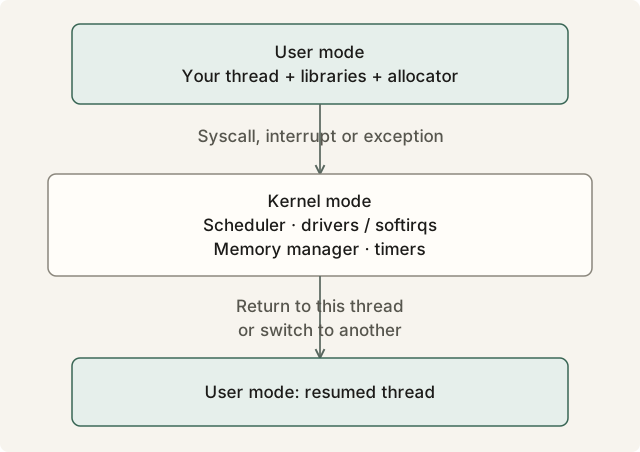
Kernel work runs on the core before a user thread resumes. Select the diagram to open it at full size.
Kernel work uses the same core’s caches while your thread is paused. A context switch changes which thread resumes.
What the kernel is made of
The kernel is a few tens of millions of lines, and most of it is drivers and filesystems your thread will never meet. The parts it will meet are the ones that manage what every process shares. The scheduler shares the cores, and needs a clock to do it. The interrupt path shares the devices, and finishes its work in deferred handlers and in threads of the kernel’s own. The memory manager shares physical memory, and does so lazily, backing pages only when they are first used. The idle path manages the cores nobody is using, and decides how deeply they sleep. Each of the four is a sound design for a machine running a thousand threads that mostly wait, and each has a cost for one thread that never waits. The sections that follow take them one at a time; first, the ladder of what each costs.
Read more: Robert Love, Linux Kernel Development (3rd ed., 2010), is the readable tour of the whole kernel, and its chapters 4, 7, 8, 12 and 15 cover the four parts above. Andrew Tanenbaum’s Modern Operating Systems chapter 1 is the classic answer to “what is an operating system”. The Wikipedia articles on Protection ring, System call and Context switch are the gentle entries to the two spaces.
2.2 The kernel’s latency ladder
Chapter 1’s ladder ran from a register to a round trip across the sea. This one runs from the cheapest thing the kernel does for a thread to the most expensive, on the same 4 GHz core, against the same 1 µs budget. Real parts and real kernels vary by a factor of two or three either way; the shape of the ladder does not. Several rows name things the later sections define: the tick is the clock interrupt the scheduler runs on, HZ times a second; a softirq is the deferred half of a device interrupt; C1 and C6 are how deeply an idle core has gone to sleep; timer slack is how late the kernel may deliver a timed wake-up.
| Event | Typical direct cost | Cycles at 4 GHz | How often, on a stock box | Section |
|---|---|---|---|---|
Clock read through the vDSO (Instant::now()) | 20–30 ns | 80–120 | whenever you ask | 2.3 |
Trivial system call (getpid) | 100–300 ns | 400–1,200 | whenever you ask | 2.3 |
read on a socket with data waiting | 1–2 µs | 4,000–8,000 | whenever you ask | 2.3 |
| Minor page fault, one zeroed 4 KB page | 0.5–1 µs | 2,000–4,000 | once per page, on first touch | 2.6 |
| Timer tick on a busy core | 1–5 µs | 4,000–20,000 | 250–1,000 per second | 2.4 |
| Device interrupt plus the softirq after it | 1–10 µs, hundreds under load | 4,000–40,000 | per packet or batch | 2.5 |
| Context switch, the switch itself | 1–2 µs | 4,000–8,000 | per preemption | 2.4 |
| Context switch, rebuilding caches and TLB afterwards | 10–100 µs | 40,000–400,000 | per preemption | 2.4 |
| A time slice given to another thread | 1–4 ms | 4–16 million | per preemption | 2.4 |
| Waking a thread whose core is in C1 | 5–20 µs | 20,000–80,000 | per wait | 2.8 |
| Waking a thread whose core is in C6 | 100–200 µs | 400,000–800,000 | per wait after a lull | 2.8 |
thread::sleep(1 µs) with default timer slack | 50–60 µs | 200,000–240,000 | per sleep | 2.8 |
| Huge-page compaction inside a page fault | 1–100 ms | 4–400 million | rare, and during a burst | 2.6 |
| Major page fault, page read from disk | 0.1–10 ms | 400,000–40 million | rare, unless memory is short | 2.6 |
Read the table against the budget. The first row fits inside a microsecond with room to spare. The next three each consume most or all of it. Every row from the timer tick down costs several budgets to several thousand, and the bottom rows cost more than the whole first day of Chapter 1’s ladder put together.
Direct and indirect cost
Each event can have direct and indirect costs; the table lists some separately, including cache rebuilding after a context switch. The direct cost is the trip: the transition into kernel mode, the kernel’s work, the return. The indirect cost is what the kernel leaves behind. Its code and data pass through your L1, L2 and TLB while it runs, and when your thread resumes it misses on whatever was evicted; its branches retrain the predictor; and if the kernel ran something else for a while, the whole working set is gone. For a system call the indirect cost is a few hundred cycles spread over the next microsecond, comparable to the call itself. For a timer tick it is a few microseconds, more than the tick. For a context switch to another thread it is the 10–100 µs row, after the thread has already lost the other thread’s whole slice. Both can appear in a histogram; their relative sizes depend on the event and the working set.
Which rows matter
None of the expensive rows happens often, and that is the shape of the problem. A loop doing one message per microsecond runs a million iterations a second. A tick at HZ=250 touches 250 of them: invisible at p50, invisible at p99, present from about p99.97 upwards, and each one is an iteration of 4 µs instead of 1. A stray thread running for 3 ms once a second adds a 3 ms gap to one service-time sample, but can delay thousands of arriving messages while the backlog drains. Per-message latency must include that queueing. The rows above the tick set the p50; the rows below it set the p99.9 and the max, and Chapter 1 argued that those are the percentiles that make or lose the money. Everything in this chapter is about the rows below the tick.
Reading your own machine
Start with what the box reports about itself, because every number in this chapter depends on it.
A command line with nothing after quiet is a stock box: nothing isolated, every core sharing everything, which is the state this chapter’s numbers describe. systemd-detect-virt printing anything but none means a hypervisor sits under the kernel with a scheduler and a tick of its own, and the guest can see neither; the steal column of /proc/stat, time the host took from this guest, is the only trace of it. The clock source should be tsc or, in a guest, a paravirtual clock such as kvm-clock, both of which keep clock reads in user space; an older source such as hpet or acpi_pm makes every clock read a system call.
/proc/interrupts is the other file to know. It has one row per interrupt source and one column per core, and the counts only go up. Take the column for one core, wait ten seconds, take it again, and the difference is everything that interrupted that core: LOC is the timer tick, the device rows are the NIC and the disks, and RES, CAL and TLB are other cores asking this one to do something. On a stock box LOC advances, on a busy core, by about ten times HZ. The sections that follow explain each row; the chapter’s lab watches them move.